
CORP & ALLIANCE AUTHENTICATION
SOUSN SEAT
____________________
1. Head to https://seat.southsunindustries.com/.
2. Ensure you register with your main toon FIRST.
3. Click the settings cog at the top-right of the screen, and select Link Character to link any alt toons you have. Please ensure you authenticate ALL toons, regardless of whether they are in corp.
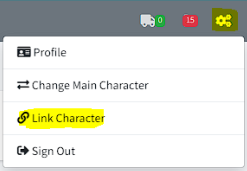
If you create a brand new account via an alt then you have not followed step 3 correctly. You’ll need to go back and link your alts to your MAIN account.
Note: The next steps in this guide can only be completed once you have been accepted into the corp. Please also note that if you change your password, your SEAT token will expire. Repeat the above steps if this occurs.

BRAVE IT SERVICES & AUTHENTICATION
____________________
Head over to the Brave Collective Core Services Website, and complete the following steps:
- Click LOG IN With EVE Online and login to your main account.
- Select your main character and click Authorize in the bottom right corner.
- Now that you’re logged in, click LOG IN With EVE Online again and repeat steps 2 and 3 for all your alt characters.
Please find the full Brave setup guide here (includes Mumble & Slack setup guide). Please ensure you authenticate ALL toons, regardless of whether they are in corp.
The Brave Mumble setup guide can be found here.
You need to set up a Whisper key for Mumble else the entire server will hear you when you speak. See this guide.
GOONFLEET AUTHENTICATION
____________________
Registration
The Goonswarm Forums are your one-stop shop for any Imperium-related info. You’ll find a full list of their policies, as well as links to their Mumble and Jabber services.
In order to join Imperium-wide fleets, you’ll need to set up an account and register ALL of your toons (even the ones out of corp).
To register, head to https://gice.goonfleet.com/ and start by creating an account (top right). You’ll be presented with a couple of options – ensure you register via Eve Online as below:
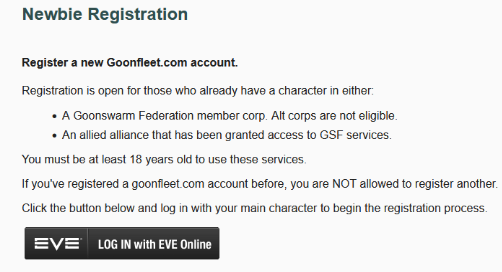
You’ll be prompted to enter an email address, so ensure you use a valid one. Once you are registered, please take the time to review the Policies and Rules thread, which can be found here: https://goonfleet.com/index.php/forum/267-policies-and-rules/
Character Authentication
Once done, you need to register all of your characters (whether they are in SOUSN or not) – to do this, select the Auth tab, choose the first option and on the next screen select Characters. You’ll be presented with this screen
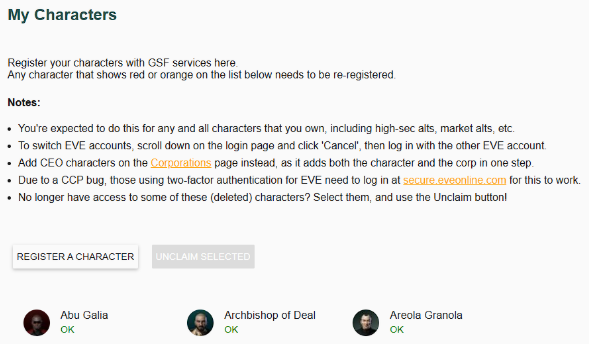
You just need to select Register a Character, and this will add your characters.
If you change your password or reset your tokens, you will be asked by Corp Leadership to re-authenticate using the steps above.
PLEASE CHECK THE STATUS OF YOUR CHARACTER – IF IT SAYS ANYTHING OTHER THAN “OK” YOU HAVE NOT DONE THIS CORRECTLY!
Ex-Imperium members
If you have re-joined the corp, or were previously a member of an Imperium alliance, you will already have a Goonfleet account set up. You will need to click a special link to fix your account so that it’s compliant: https://gice.goonfleet.com/Group/Reset
You should see a page that looks like this:
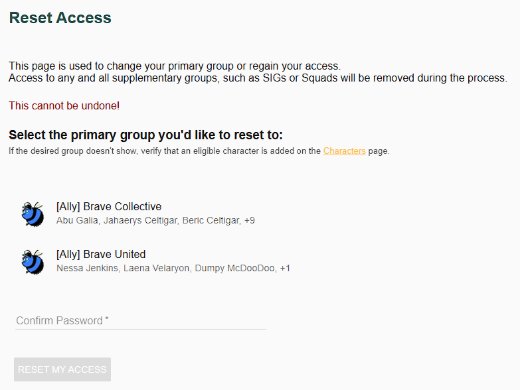
You’ll need to select [Ally] Brave Collective if you’re reauthenticating a South Sun Industries (nullsec) toon and [Ally] Brave United if it’s a South Sun Logistics (hisec) toon.
Once you’ve entered your password and hit RESET MY ACCESS, you may still need to add your characters – if so, please repeat steps from the Character Authentication section of this guide.
removing esi tokens
____________________
It’s a good idea to revoke any ESI tokens you have from previous corps/alliances.
Start by heading to https://developers.eveonline.com/authorized-apps.
Select the relevant application.
Click the red “Revoke Access” button.